The restaurant operating system
Run your whole restaurantfrom one screen
Counter POS, branded online ordering, QR table service, kitchen display, delivery dispatch, inventory, loyalty, AI insights and built-in marketing — together in one platform, priced like a single tool. Card payments go through your own Stripe account, commission-free. Built for restaurants in the UK, Europe and the USA.
No card required · Full features on trial · Set up in minutes
0%
commission on card payments
your own Stripe account
20
storefront languages
translated menus built in
19
modules, one login
counter to chain HQ
6
staff roles
PIN fast, audited always
Everything included
One platform, every job in the house
No app store juggling, no per-terminal licenses, no integrations to babysit. Each module is built into the core — they share one menu, one stock count and one customer list.
Counter POS register
Ring orders in seconds on any tablet. Split the bill evenly or per guest, apply discounts and promos, accept cash or card, print bills — all from one screen.
Branded online ordering
Your own web store at your address, in your colors, in your customers’ language. Guests order and pay from their phone — no commission-hungry middleman.
Card payments, your Stripe account
Paste your own Stripe keys once and every card charge — counter scan-to-pay QR, online store, kiosk — lands straight in your bank. Savora never holds the money and takes no cut.
AI insights on tap
A daily AI brief of your revenue, repeat rate, best sellers and peak hours — plus plain-English opportunities like which dish to push this weekend.
Marketing built in
Email and SMS campaigns to your whole list or smart segments — loyalty members, VIPs, win-back. Review requests ask happy guests for five stars automatically.
Chain mode for groups
One owner login for every branch: group revenue in one dashboard, per-location cards, and one click to jump into any site’s POS. Open branch two without a new account.
QR table ordering
Print a QR per table once — it never expires. Guests scan, browse, order and pay; the ticket lands tagged to that table and the floor plan updates live.
Kitchen display system
Color-coded tickets with prep timers, course firing for starters and mains, and voice alerts so the pass never misses an order — even at full volume.
Delivery dispatch board
Assign drivers, hand off orders, track out-for-delivery to delivered. Customers get notified at every milestone — by email or SMS.
Inventory that thinks
Attach recipes to menu items and stock deducts itself with every sale. Waste logging, low-stock alerts and cost tracking keep margins honest.
Loyalty & gift cards
Customers earn points every visit and redeem at checkout in seconds. Sell and accept digital gift cards, run promo codes with limits and expiry.
Team & roles that fit
Six roles from owner to driver, each with a fast PIN or an emailed password invite. Clock-in and out, tip-out reports, and a full audit trail of every action.
Analytics that decide
Menu engineering sorts dishes into stars, plowhorses, puzzles and dogs. X/Z reports close the day; the group dashboard rolls up every location.
Happy hour pricing
Schedule percent or fixed price rules by weekday and time window — early bird, late night, brunch. The register and the web store follow automatically.
Works with your hardware
ESC/POS thermal receipts and kitchen tickets, cash drawer kick on cash sales, drawer no-sale and paid-in/out tracking — standard 80mm printers welcome.
Built for UK, EU & USA
VAT-inclusive pricing for the UK and Europe, add-on tax for the US, ten-plus storefront languages, and SEO plus AI-answer optimization so new guests find you.
Reservations & floor plan
Take bookings, seat walk-ins and watch every zone on a live floor plan — tables flip from available to occupied the moment their ticket opens.
See it in action
Screens your team will actually live in
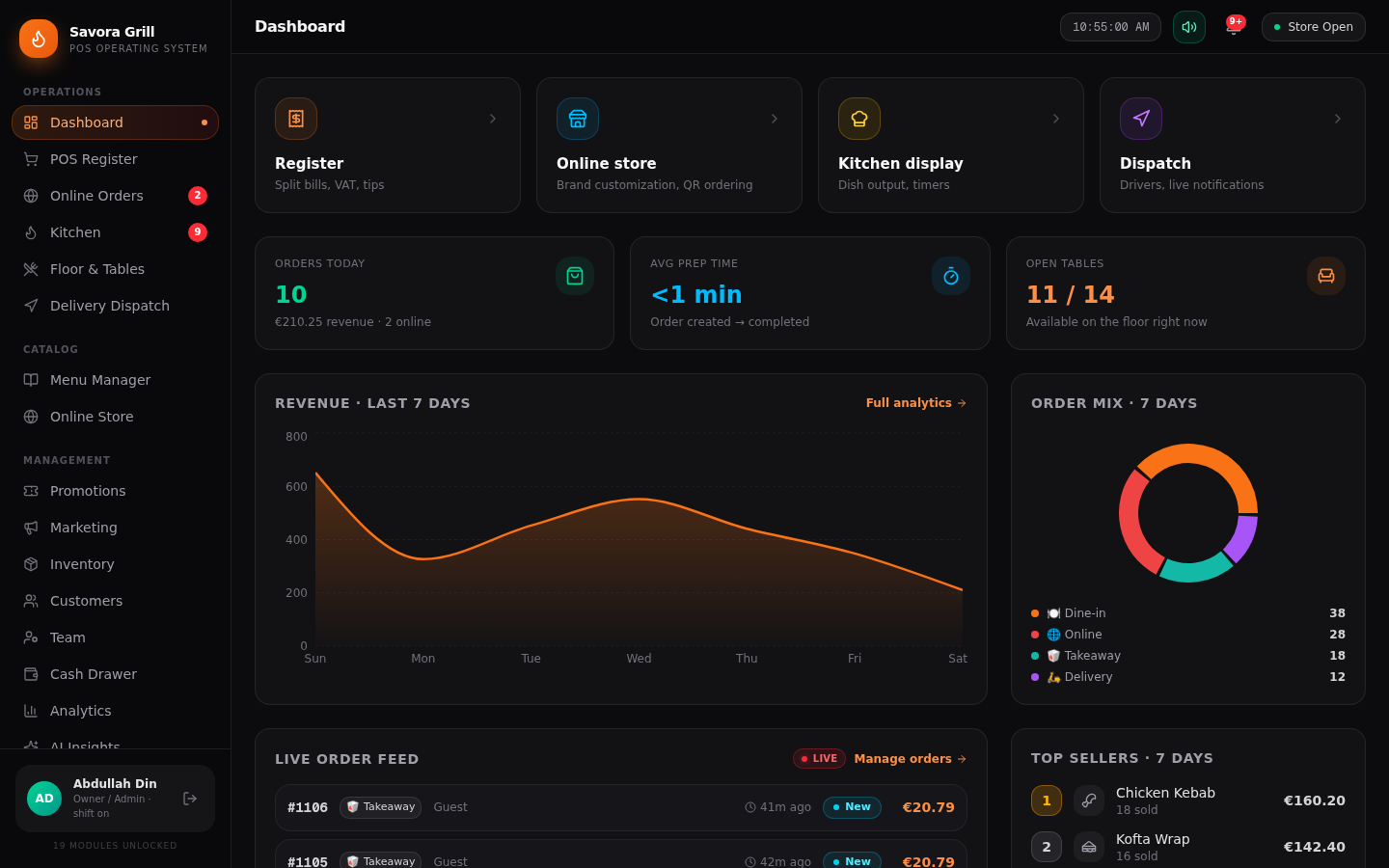
No stock photos. These are the real product — the register your cashiers ring on, the store your guests order from, and the numbers you close the day with.
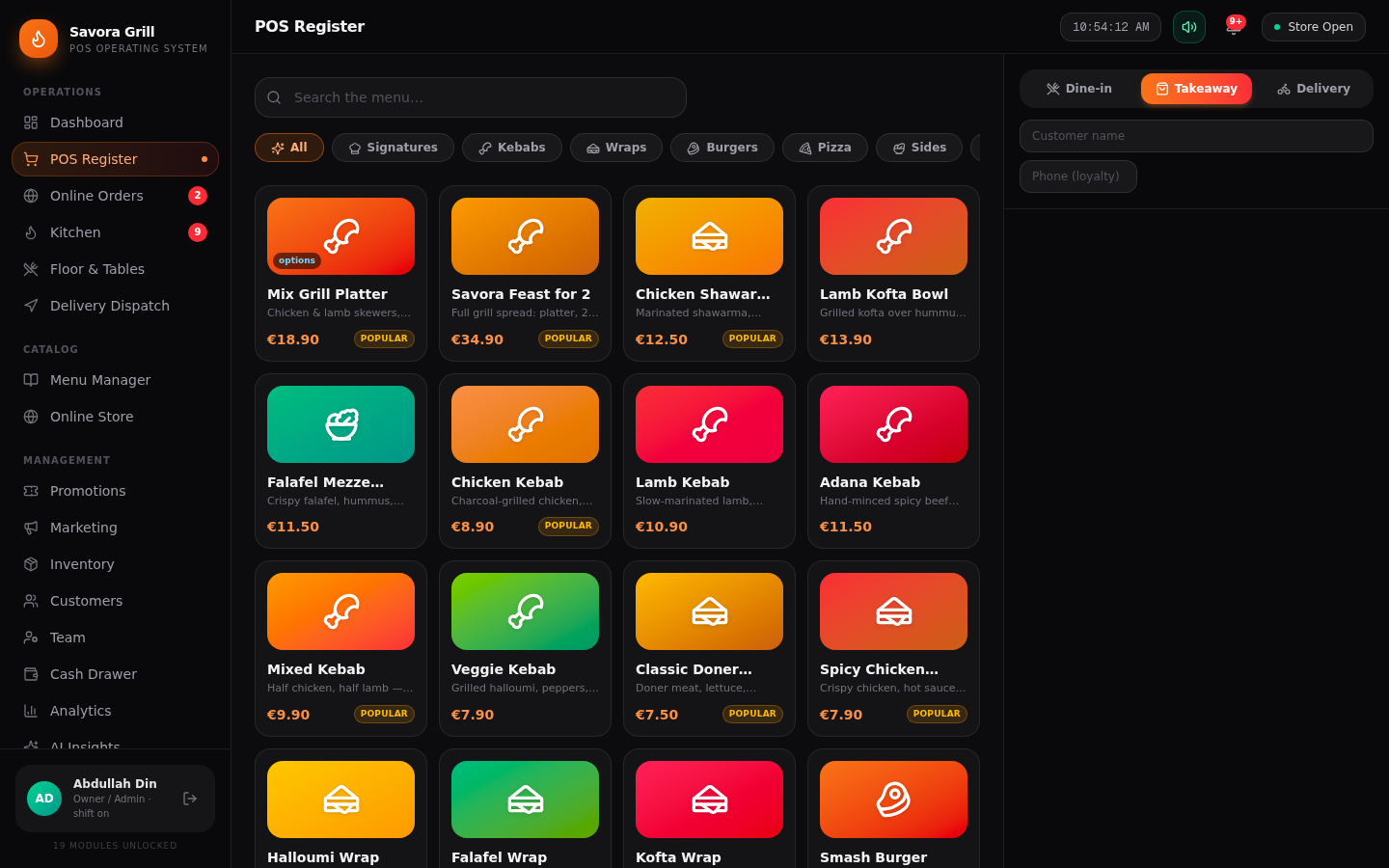
The register
A menu your newest hire can ring in on day one — modifiers, notes, split bills and tenders on one screen.
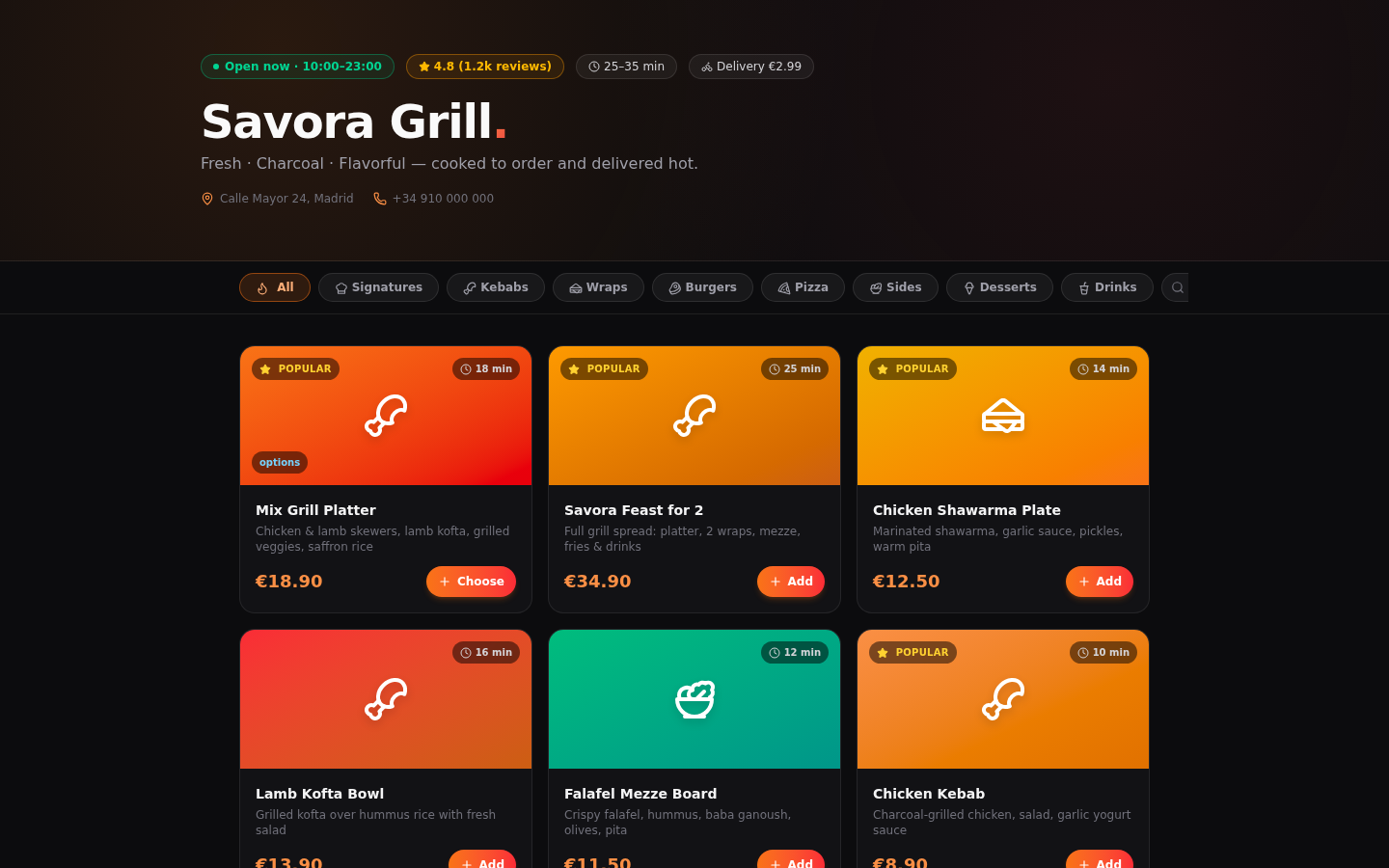
The online store
Your brand, your colors, your photos — customers order from their phone and pay on your Stripe, not ours.
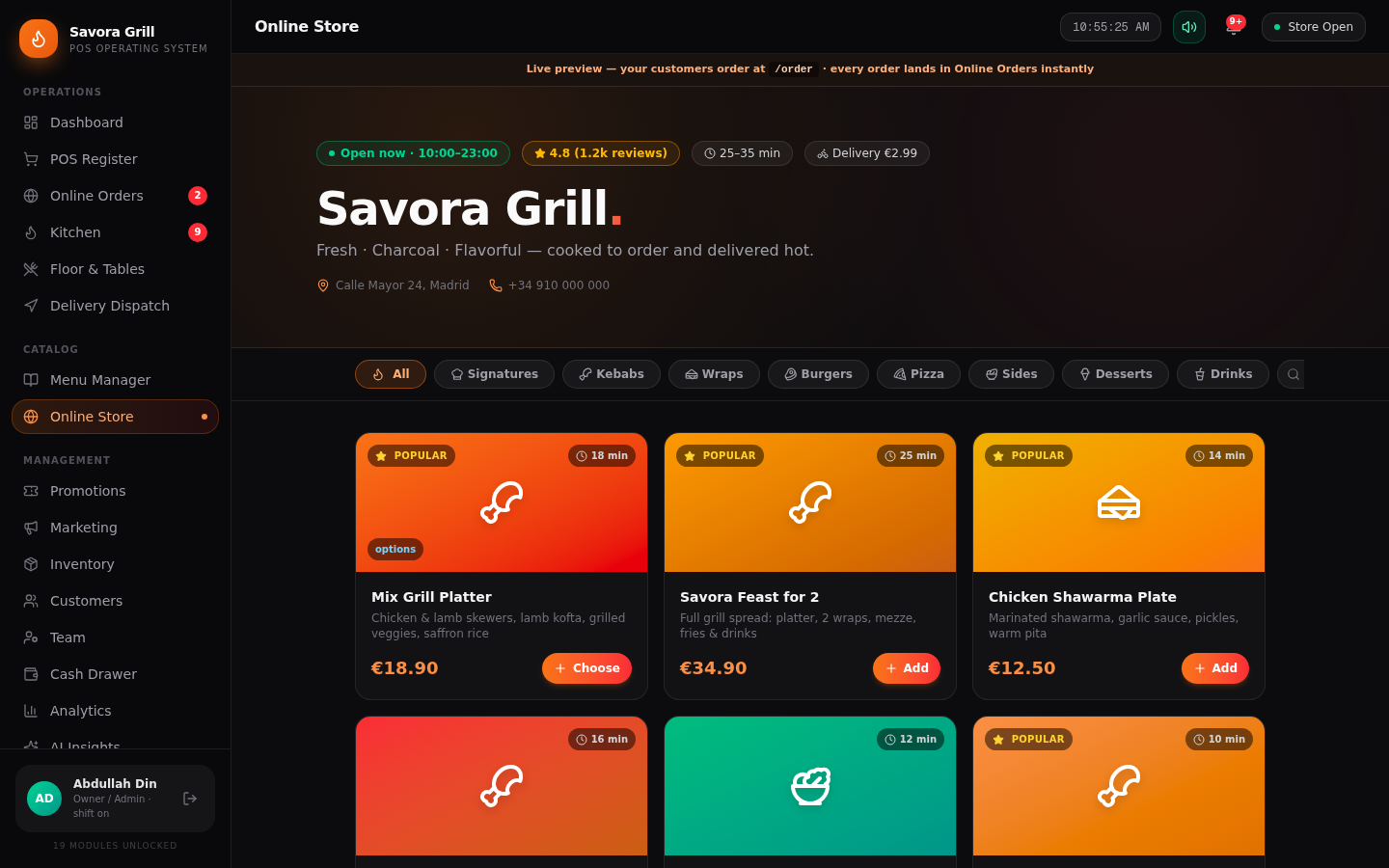
The live preview
Edit your storefront and watch it update in real time — every order lands in the POS the second it is placed.
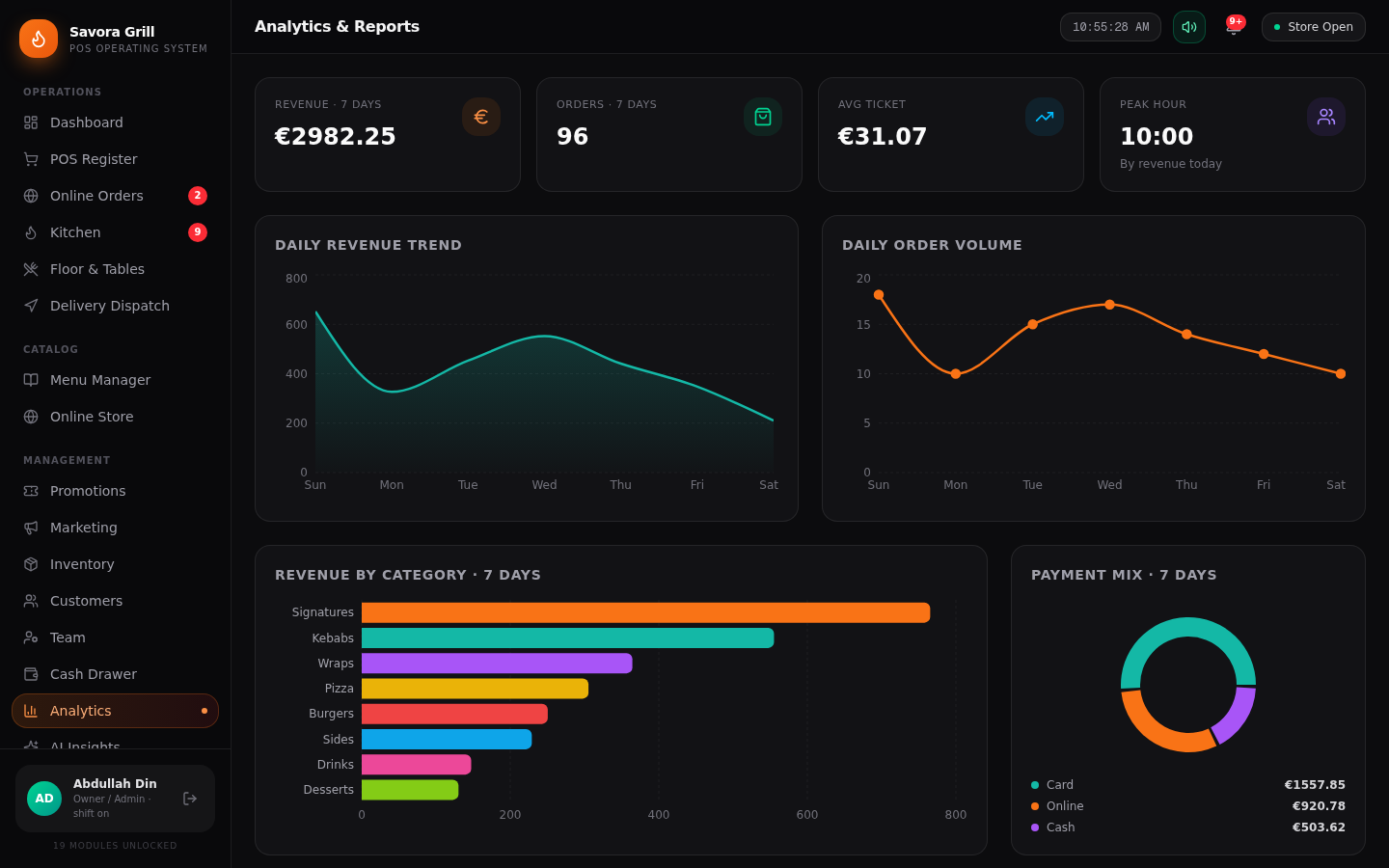
The numbers room
Revenue trends, order volume, category performance and payment mix — the reports owners actually read.
Who it's for
Built around how you serve
One platform, tuned for very different rooms — the dining room, the counter, the van and the group office.
Full-service restaurants
Reservations, a live floor plan, per-table QR ordering and bills that split however the table asks.
Quick service & takeaway
Counter-speed ordering with a kitchen display that fires courses and calls out due tickets.
Cafés & bakeries
Morning-rush speed, loyalty points that bring people back, gift cards that sell themselves.
Food trucks & markets
A tablet POS that keeps ringing orders when the Wi-Fi doesn’t come along — sales queue offline and sync back.
Chains & groups
Every branch on one dashboard — open location two without creating a new account.
Not sure where you fit?
Start a trial, load the demo restaurant, and press every button. Wipe it and go live with your own menu whenever you are ready.
How it works
Live before your next shift ends
Register your restaurant
Two minutes: name, web address, owner PIN. No card required — you start on a full-feature trial.
Set up with the wizard
Brand colors and logo, menu with photos and modifiers, floor tables, languages, currency and tax mode — a guided first run.
Start selling everywhere
Counter register, QR tables, online store, delivery dispatch and kitchen display go live together — same menu, one truth.
Why Savora
Compare us before you commit
The old POS players lock you into their terminals and payments. The delivery apps take a cut of every plate. Savora is the third way.
| What matters | Savora | Legacy POS (Toast, Lightspeed…) | Delivery apps (Uber Eats, Deliveroo…) |
|---|---|---|---|
| Commission on your food | None | None | 15–30% per order |
| Card payments | Your own Stripe account — instant payouts | Locked to their payments, long contracts | Their wallet, payout delays |
| Your own branded web store | Yes | Add-on, often extra cost | — |
| Customer list you keep | Yes | Usually locked in | — |
| Email & SMS marketing | Yes | Paid add-on | — |
| AI insights & menu engineering | Yes | Higher tiers only | — |
| Works offline when Wi-Fi drops | Yes | Some, with local servers | — |
| Multi-branch chain dashboard | Yes | Enterprise pricing | — |
| 10+ languages per store | Yes | Rare | — |
| Hardware you already own | Any tablet + 80mm printer | Their terminals | Their tablet |
| Contract & lock-in | Monthly, cancel anytime | 1–3 year contracts | Per-order terms |
Pricing
Fair pricing, no commission on your food
Every plan includes the full POS, online store and kitchen display. Upgrade when you need dispatch, inventory intelligence and multi-location.
Trial
Everything in Pro — no card required.
Free14 days
- All Pro features
- Full setup wizard
- Demo data you can wipe
- Cancel by doing nothing
Starter
For cafés and single-location takeaways.
€49/month
- POS register + online store
- QR table ordering
- Kitchen display
- Loyalty & promos
- Email support
Pro
For full-service restaurants and groups.
€99/month
- Everything in Starter
- Delivery dispatch + notifications
- Inventory with recipes
- Menu engineering & Z reports
- Multi-location dashboard
- Priority support
Pay monthly, cancel anytime. Your data stays yours — export menus, customers and reports whenever you like. Card processing is billed by Stripe at their standard rates; Savora adds nothing on top.
FAQ
Questions, answered
What do I need to run Savora?
Any modern device with a browser — an iPad at the counter, an Android tablet in the kitchen, a laptop in the office. Optionally add an ESC/POS thermal printer and a cash drawer; both are supported natively.
Does it work offline or on tablets?
Yes. Savora installs to the home screen as an app and keeps working when the Wi-Fi drops — orders taken offline are queued and sent the moment you are back online.
Which countries, currencies and tax modes are supported?
Savora is built for the UK, Europe and the USA: VAT-inclusive pricing where tax must be included in menu prices, add-on tax where it is not, and ten-plus storefront languages with full translations you can edit.
How do payments work?
You connect your own Stripe account once — paste your secret and publishable key in Settings, Savora verifies it with a live connection test, and every card payment (counter scan-to-pay QR, online store, kiosk) is charged straight into your Stripe balance. Savora never touches the money and takes no commission on payments; Stripe charges its normal processing fee. Before you connect, the card buttons run a built-in demo engine so the whole POS still works.
Can I run several locations?
Yes — chain mode is built for it. Each location keeps its own branding, menu, staff and reports, and the All Locations dashboard rolls up group revenue, orders and staff on shift across every branch. One owner login switches between sites with a single click.
Can Savora send emails and SMS to my customers?
Yes. Build a campaign, pick an audience — all customers, loyalty members, VIPs, win-back or new — and send it, or attach a promo code. Review-request campaigns ask happy guests for a Google or TripAdvisor rating. Messages are stored in a customer outbox exactly as they would be received; add your SendGrid / SMS provider key on the server and sends go live automatically.
How does the online store help guests find me?
Every store ships with SEO metadata, Open Graph tags, structured data, hreflang for your languages and an AI-friendly llms.txt — so you rank on Google and get recommended accurately by AI assistants.
Your restaurant, running as one.
Join the platform that treats the counter, the kitchen, the courier and the customer as one system.
Full-feature 14-day trial · No card required